Why this matters: revision control is governance, not formatting
Before we talk tools, it’s worth naming the core issue: most teams rely on informal habits (copies, filenames, emails) to manage something that should be governed like a contract artifact. When the revision lineage isn’t controlled, small slips turn into scope drift, late disputes, and rework during buyout. This post focuses only on revision control: where it breaks, why it’s costly, and how Zurel ScopeMaker fixes it with a simple, disciplined model.
The common failure modes of broken revision control
The pitfalls below show up on nearly every project. None are dramatic on their own—but together they erode clarity, slow procurement, and increase exposure.
- Manual numbering and filenames
Teams create “Rev 1 / Rev 2” by hand. Two people create “Rev 3” separately; both circulate. You now have parallel histories and no authoritative sequence. - Old revisions remain editable
Early drafts sit in shared drives with full edit rights. Someone “fixes” an older copy and sends it out. Days later, you discover procurement decisions were based on the wrong revision. - No accountable record of who/when
Revisions aren’t tied to a creator and timestamp in a reliable log. When a dispute arises, you can’t point to “Rev 3 was created by ___ on ___ at ___,” which undermines governance and slows audits. - Revisions aren’t visibly stamped on PDFs
Even if internal files have revision names, the exported PDFs don’t—unless someone manually includes the revision number. Stakeholders compare untagged PDFs and talk past each other. Which document is “Rev 3”? No one can tell on the page. - No clean lineage from first draft to award
You can’t move quickly from the current document to its prior revision and see the chain. Without an obvious “previous → current” path, audits stall and confidence drops. - Status ambiguity during procurement
Teams use “final,” “final2,” or “sendthis_one” as implicit status. Without a shared revision schema, people distribute exhibits that aren’t actually ready. - Final revision left editable
The “final” revision isn’t explicitly locked. A well-meaning tweak after circulation creates multiple “finals,” undermining award confidence and reopening negotiation.
Why these failures create risk—and real cost
When the “current” state is uncertain, risk moves from technical to commercial. The problem isn’t just accuracy—it’s the cost of defending and reconciling that accuracy across parties. Collectively, these issues introduce uncertainty into procurement. When teams can’t reliably tell which revision is current, who created it, and when it was created—on the face of the PDF—scope alignment erodes. That misalignment shows up as disputes, delayed awards, conservative pricing from subs, and late discovery that pushes work into change exposure. In short: unclear revision control converts coordination work into commercial risk.
The hidden price tag is the overhead required to manage that risk manually. Extra review cycles, cross-check meetings, “just to confirm” emails, and ad-hoc signoffs attempt to substitute for governance. They reduce risk unevenly while consuming manager hours and calendar days. The outcome is slower buyout, higher soft costs, and strained trade relationships—even when a project avoids a formal change.
How Zurel ScopeMaker implements bulletproof revision control
Effective revision control comes down to one editable revision at a time, frozen history for earlier revisions, printed revision tags on every exported PDF, and unambiguous states that everyone recognizes. ScopeMaker makes that discipline the default.
1) Document stage model
A clear stage model designed to remove ambiguity and control edits during procurement. Stages: DRAFT → ON HOLD → COMPLETE.
2) DRAFT (active editing state)
The latest revision is editable. All prior revisions are frozen and not editable. Use this stage while making changes. Suspend edits and create a frozen snapshot by switching to ON HOLD.
3) ON HOLD (frozen review state)
All revisions are frozen and cannot be edited. When ready to continue editing, start a new editable revision by switching to DRAFT. If ready to finalize, switch to COMPLETE.
4) COMPLETE (final, immutable state)
All revisions are frozen and cannot be edited, ever. Use this state when everything is done and set in stone—assured it can no longer be changed.
5) Stamped revisions & one‑click navigation
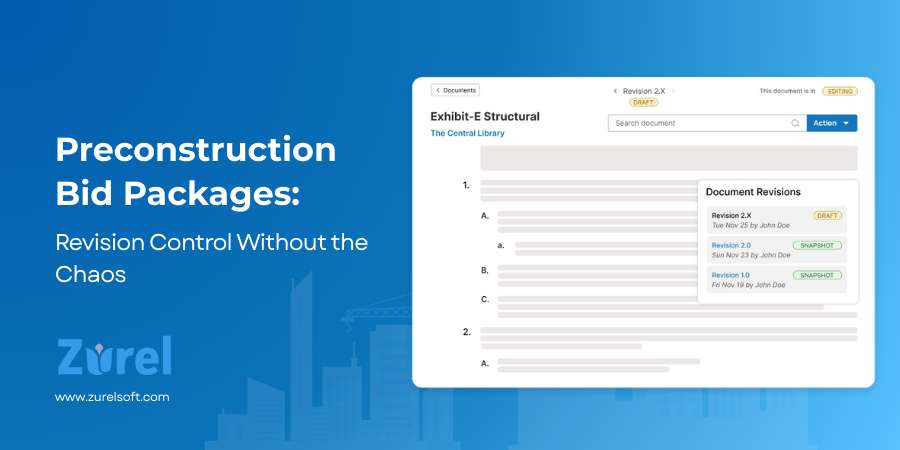
All revisions are stamped with who and when, and just a click away from each other. Open any revision and jump to earlier or later ones without hunting folders.
6) Visible revision on every exported PDF
Export any revision as a PDF. ScopeMaker prints the revision number and date on the page by default so everyone knows exactly which revision they’re reviewing.
7) Branchable lineage from any revision
Copy any revision to create a new branch of lineage. The new document starts its own lineage in DRAFT, while maintaining its link to the original lineage for full traceability and audit.
From Template to Award: A Revision Control Walkthrough
The preconstruction team begins by copying a Smart Template (see Blog B‑130 on Smart/Master Templates) to create a fresh Scope Exhibit. They work in DRAFT, shaping scope notes and clarifications until the exhibit reads the way they want it to. When it’s time to invite bids, the PM flips the document to ON HOLD, and ScopeMaker creates Rev 1.0—a frozen snapshot stamped with the revision number. That PDF goes out for solicitation, and because 1.0 is locked, everyone reviews the same thing.
Questions come back from trades. The team switches the document back to DRAFT, makes clarifications, tightens a few lines, and—before negotiations—moves again to ON HOLD. ScopeMaker creates Rev 2.0. This is the negotiation snapshot: no edits are possible, so conversations stay precise.
With terms settled, the team returns to DRAFT for a final polish, then finalizes the exhibit to COMPLETE, locking Rev 3.0. That becomes the award/distribution source of truth. Later, when a sub references an earlier copy, the PM opens lineage, pulls up Rev 1.0 and Rev 2.0 alongside Rev 3.0, and resolves the question in minutes—every state visible, every change accounted for.
Conclusion
The goal isn’t more steps; it’s fewer arguments and faster awards. When revisions are created intentionally in DRAFT, earlier states are frozen, PDFs carry visible rev tags, creators and timestamps are recorded, and status moves clearly through DRAFT → ON HOLD → COMPLETE, the noise disappears. ScopeMaker makes that discipline the default: one‑click revisions, frozen history, stamped exports, and clear states so Preconstruction can move from negotiation to award with confidence—and without chaos.
Frequently Asked Questions
About Author